
Finding a reliable laptop under ₹25,000 in 2026 is not easy. Most options in this budget compromise heavily on performance, storage, or long-term usability. However, one laptop that consistently stands out as a balanced, dependable, and practical choice is the Acer Aspire 3 (15.6-inch, Intel Celeron N4500 variant).If you are a student, first-time laptop buyer, office user, or someone who needs a smooth machine for daily work, this detailed guide will clear all doubts and help you decide whether the Acer Aspire 3 is the right laptop for you.
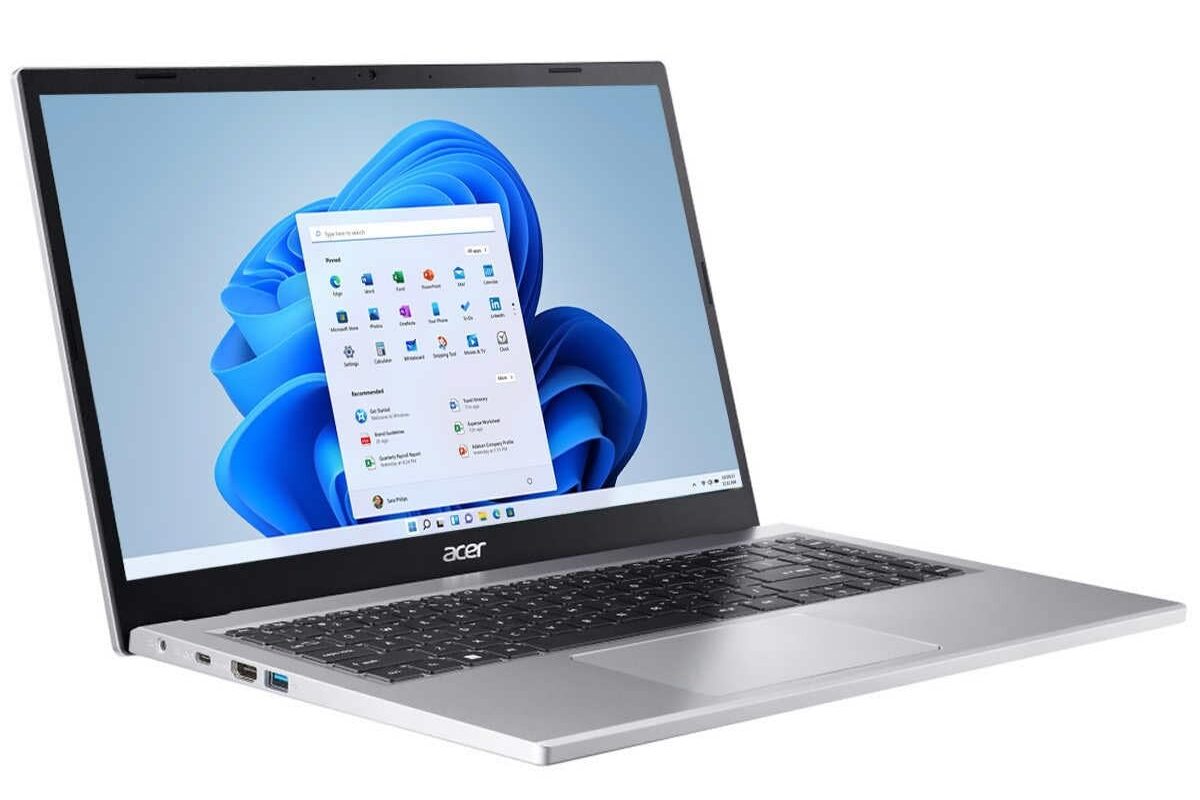
Why Acer Aspire 3 Is the Best Pick Under ₹25,000
In the ultra-budget segment, buyers usually face three major problems:
- Slow performance after a few months
- Poor display and build quality
- Limited storage and outdated software
The Acer Aspire 3 avoids most of these issues, making it a strong all-rounder rather than a temporary solution.
Who Should Buy This Laptop?
- School & college students
- Online class and exam preparation users
- Office work (MS Word, Excel, PowerPoint)
- Browsing, YouTube, Netflix, OTT streaming
- Beginners learning computers
- Small business & billing use
Detailed Specifications Overview
Let’s start by understanding what hardware you actually get in this budget.
Key Specifications
- Processor: Intel Celeron N4500 (Dual-Core, up to 2.8 GHz)
- RAM: 8 GB DDR4
- Storage: 256 GB SSD
- Display: 15.6-inch HD (1366 × 768)
- Operating System: Windows 11 Home
- Graphics: Intel UHD Graphics
- Weight: Approx. 1.9 kg
For under ₹25,000, 8 GB RAM + SSD + Windows 11 is already a big win.
Performance: What Can You Expect in Real Life?
The Intel Celeron N4500 is designed for efficiency and stability, not heavy gaming or video editing. But for everyday tasks, it performs surprisingly smoothly when paired with SSD and 8 GB RAM.
Everyday Usage Performance
✔ Fast boot time (10–15 seconds)
✔ Smooth web browsing with multiple tabs
✔ Comfortable online classes & Zoom meetings
✔ MS Office tasks without lag
✔ YouTube & Netflix up to Full HD smoothly
What It’s NOT Meant For
✖ Heavy gaming
✖ Professional video editing
✖ Advanced 3D design software
💡 Honest Truth:
If your daily work is browsing, typing, studying, or watching content — you will not feel slow performance.
RAM & Storage: The Biggest Advantage
8 GB RAM – Rare at This Price
Most laptops under ₹25,000 still ship with 4 GB RAM, which struggles with Windows 11. Acer offering 8 GB RAM makes a huge difference in multitasking and long-term usability.
You can:
- Open Chrome with multiple tabs
- Use Word + Excel together
- Attend online classes without system freeze
SSD Storage – Faster Than HDD
The 256 GB SSD ensures:
- Faster startup
- Quick app opening
- Smooth Windows updates
This alone makes the Aspire 3 feel 2× faster than old HDD laptops.
Display Quality: Big Screen for Comfort
The 15.6-inch HD display is perfect if you prefer:
- Bigger text
- Comfortable movie watching
- Split-screen multitasking
Display Highlights
- Matte finish (less glare)
- Comfortable for long study hours
- Good brightness for indoor use
⚠ Resolution is HD, not Full HD — but acceptable at this price.
Keyboard & Trackpad Experience
Keyboard
- Full-size keyboard
- Well-spaced keys
- Comfortable typing for long hours
Students and office users will appreciate the typing comfort, especially for assignments and emails.
Trackpad
- Smooth and responsive
- Supports Windows gestures
- Accurate clicks
Build Quality & Design
For a budget laptop, the Acer Aspire 3 looks clean and professional.
- Minimalistic design
- Strong hinge
- Solid plastic build
- Doesn’t feel cheap
It’s not flashy — but durable and practical, which matters more at this price.
Ports & Connectivity: Everything You Need
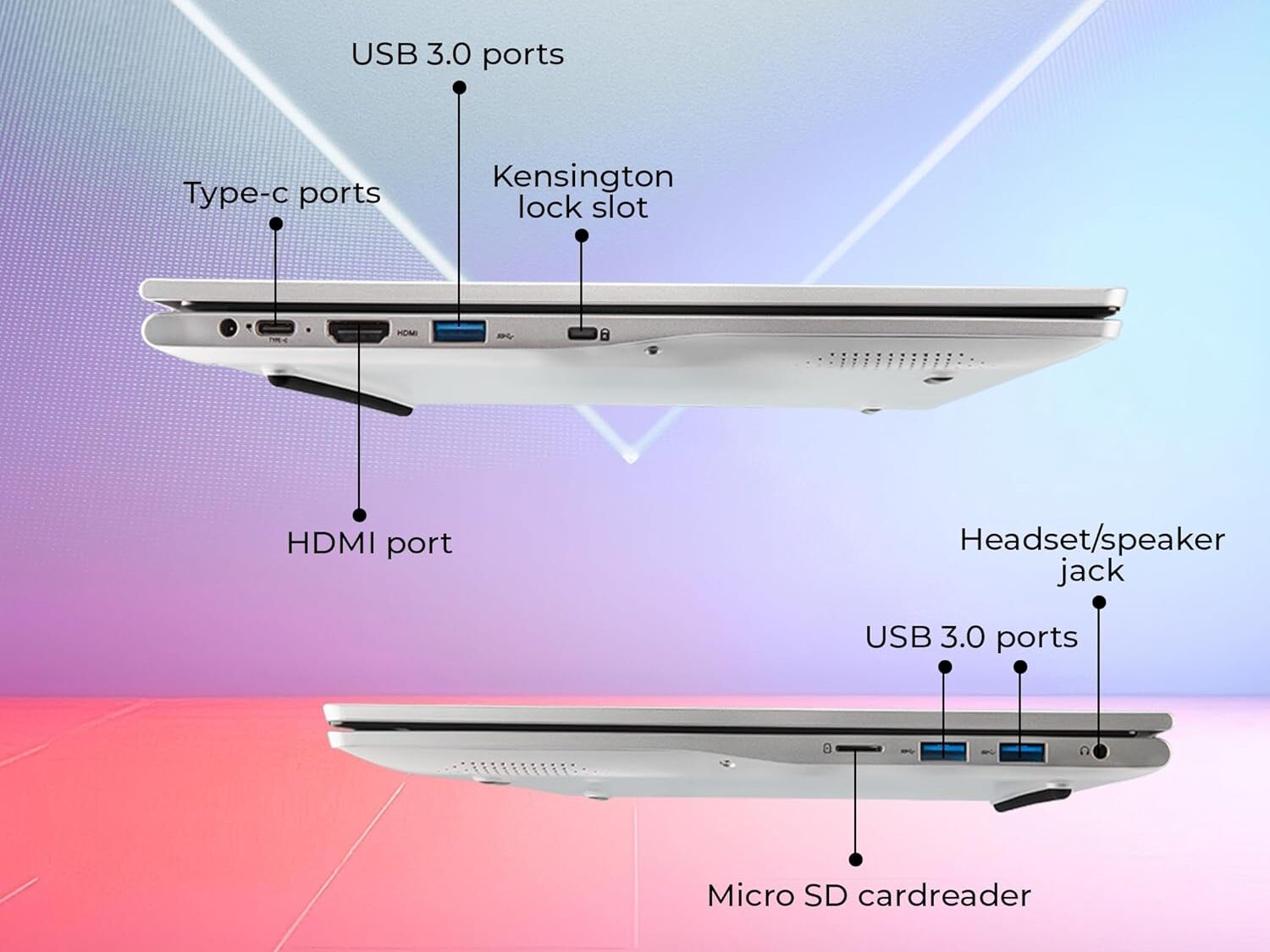
You get all essential ports:
- USB 3.0 ports
- USB 3.0
- HDMI
- Audio jack
- Wi-Fi & Bluetooth
Perfect for:
- Pen drives
- External keyboard & mouse
- Projector or TV connection
Battery Life: Reliable for Daily Work
Battery backup depends on usage, but on average you can expect:
- 5–6 hours for browsing & documents
- 4–5 hours for video streaming
Good enough for:
- College classes
- Office meetings
- Power-cut situations
Windows 11: Ready for the Future
The laptop comes with genuine Windows 11 Home, which means:
✔ Latest security updates
✔ Modern UI
✔ Long software support
✔ No extra OS cost
You save money and avoid piracy issues.
Pros & Cons (Honest Review)
✅ Pros
- 8 GB RAM in budget
- SSD storage
- Large 15.6-inch screen
- Windows 11 included
- Reliable brand support
❌ Cons
- Not for gaming or editing
- HD display only
- Basic processor
Acer Aspire 3 vs Other Laptops Under ₹25,000
| Feature | Acer Aspire 3 | Typical Budget Laptop |
| RAM | 8 GB | 4 GB |
| Storage | SSD | HDD / eMMC |
| Screen | 15.6″ | 11–14″ |
| OS | Windows 11 | DOS / Linux |
| Brand | Trusted | Lesser-known |
👉 Clear winner for daily use
Is Acer Aspire 3 Good for Students?
Absolutely yes.
Students need:
- Stability
- Comfortable screen
- Good keyboard
- Long-term reliability
This laptop checks all boxes for:
- Online classes
- Exam preparation
- Assignments
- Research
Long-Term Use: Will It Last?
With:
- SSD storage
- 8 GB RAM
- Genuine Windows
The Acer Aspire 3 can easily last 3–4 years for normal usage without becoming painfully slow.
Final Verdict: Should You Buy It?
If your budget is strictly under ₹25,000 and you want a safe, reliable, no-nonsense laptop, the Acer Aspire 3 is one of the best choices in 2026.
⭐ Our Recommendation
- Best for: Students, beginners, office users
- Avoid if: You need gaming or editing power
- Overall Rating: ⭐⭐⭐⭐☆ (4.3/5)
